


Find my Phone - Family Locator
4.46.44K Reviews
App Specs
- Version
- 6.39.1
- Updated On
- License
- Free
- Downloads
- 10,000,000+
- Developer
- GEO TRACK LABS LTD
- Categories
- Travel & Local
- Platform
- Android, iOS
Screenshots
 Analysis by AppCompare
Before installing a family locator, I’d ask one practical question: will everyone who needs to be found actually use it? A location app is only useful when the people involved have agreed to participate, installed it, and can keep their phones available. That makes this kind of tool less like a remote-control button and more like a shared household routine.
I’d also decide what problem I’m trying to solve. Finding a misplaced phone, checking whether a child reached school, and coordinating a late pickup are related needs, but they are not identical. A locator can reduce unnecessary calls and uncertainty; it should not replace direct conversation, a backup plan, or emergency services. I find it most valuable when it answers a small, recurring question without turning every movement into a conversation.
Choose a routine, not just a map
For a family, the most useful setup is usually a narrow one. Start with the people who genuinely need to coordinate, agree on when location sharing is appropriate, and decide what an alert means before enabling it. For instance, an arrival notification can be a quiet reassurance rather than an invitation to ask why someone stopped on the way. That distinction helps keep a safety tool from becoming a source of friction.
It is also worth thinking about the person who is least comfortable with apps. If a relative is likely to ignore prompts or struggle with account setup, walk through the process together while you are in the same room. Confirm that they know how to open the app and send an SOS, rather than assuming that installing it means they will remember how to use it under stress. A short practice run is more useful than discovering a problem during a real delay.
Where it can make an ordinary day easier
Imagine a school pickup when one parent is stuck in traffic and another family member is already waiting. Instead of sending repeated messages, the group can check the shared location and adjust who goes where. If the child’s arrival at school is the main concern, a geofence can provide a simple check-in. The useful part is not watching a moving dot all afternoon; it is having a clear signal for a moment that matters.
The same idea works for an older relative who is comfortable carrying a phone but may not always remember to call after reaching an appointment. Location sharing can help family members coordinate a lift or check that a journey is progressing, while an SOS option offers a direct way to alert them if help is needed. I would still treat the phone as a communication aid, not a guarantee of safety: a device can be out of reach, switched off, or unable to send a current position.
How it differs from the usual alternatives
A phone’s built-in find-my-device service is often the more direct choice when the only goal is recovering your own lost handset. It is designed around locating a device tied to your account, while a family locator is aimed at ongoing coordination among several people. If you only misplace your phone occasionally, a dedicated device-finding tool may be simpler than asking relatives to join a shared system.
Worth Reading Before You Choose

Flipboard Shows What News Apps Must Do Beyond the Feed

Switching to Android Auto Means Rethinking Your Driving Routine

Google Calendar Makes a Crowded Week Easier to Manage

Ludo King Makes the Most of the Minutes Between Plans

Baby Panda World Brings Quick Play to Modern Phones, but Its Game Library Feels Busy

ESPN’s Live Game View Makes Following Close Games Easier
At the other end, ordinary calls and messages are more respectful of privacy and need no shared map. They work well when updates are occasional and everyone can answer. A family locator makes more sense when the same check-in happens frequently, or when a specific arrival or departure is worth knowing without interrupting someone. I would not use continuous location access simply because it is available; the benefit should be clear to everyone involved.
There is also a difference between a family map and a navigation app. Navigation is for choosing and following a route; family location is about coordinating people and checking where a device is. One does not replace the other. If the real need is turn-by-turn directions, use a navigation tool. If the need is to know whether a family member has arrived, this app’s family-oriented approach is closer to the job.
Small habits that improve the experience
One useful approach is to create only the places that matter. Home, school, or a regular care appointment are easier to act on than a long collection of zones that generate noise. Before relying on an arrival alert, check that the person’s usual routine and phone habits make it meaningful. An alert that is frequently late or ignored can create more worry than it saves.
Location history is best treated as a practical aid, not a diary to inspect out of curiosity. It may help someone remember where a family member was picked up or retrace a route, but routine checking can undermine trust. I’d agree in advance on who can see location information and why, especially with teenagers and adults who share a household but do not need to account for every stop.
Battery and connectivity deserve a place in the plan, too. Any phone-based location service depends on the handset being usable and able to communicate; a map that has not refreshed should not be mistaken for a live view. If someone is travelling, a quick call or agreed text remains a sensible backup. The app can reduce uncertainty, but it cannot remove the ordinary limits of a phone.
There is a setup cost beyond downloading: each participating person has to be willing to install the app, create or join the shared arrangement, and understand its controls. That can be a fair trade for a household that coordinates often. It is unnecessary overhead for a couple who rarely need location updates, or for someone who only wants to find a misplaced device once in a while.
Ever misplaced your phone and wished you had a magic wand to locate it? Well, the Find my Phone - Family Locator app might just be the next best thing. I recently took this app for a spin, and let me tell you, it’s got some pretty nifty tricks up its sleeve. If you're someone who's constantly on the hunt for your phone—or worried about keeping tabs on your loved ones—this app might be your new best friend.
A Glimpse into Find my Phone - Family Locator
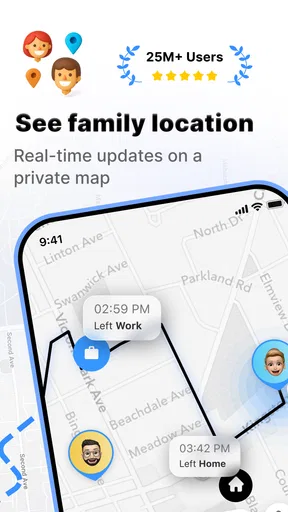
First off, let’s talk about what Find my Phone - Family Locator actually does. The app is designed to help you locate your phone in a jiffy, but it doesn’t stop there. It doubles as a family locator, allowing you to keep track of your family members’ whereabouts with ease. No more frantic messages asking, “Where are you?” when someone is running late. The app provides real-time updates, so you can see exactly where everyone is.
Setting it up was a breeze. I downloaded and installed it in less time than it takes to make a cup of coffee. Once you’ve got it on your device, you’ll need to create an account and add your family members. Everyone needs to have the app installed, which might be a bit of a hurdle for the less tech-savvy folks in your family, but once it’s set up, it’s smooth sailing.
Features You’ll Love
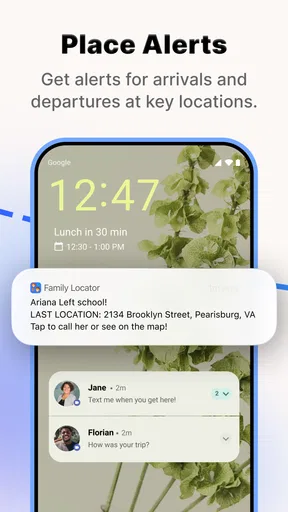
One of the standout features of this app is the geofencing option. You can set up specific zones, like home, work, or school, and get notifications when someone enters or leaves these areas. It’s a great way to ensure your kids made it to school safely or if your partner’s on their way back from work.
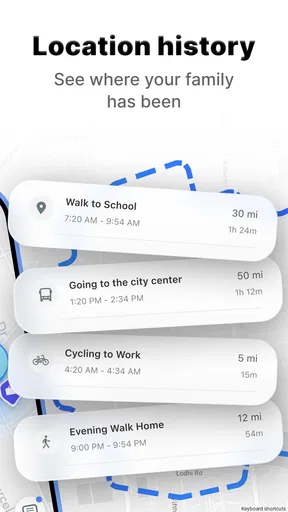
The app also boasts a nifty location history feature. Curious about where you were last weekend? Or perhaps you need to remember that route you took on a road trip? The location history will have you covered. It keeps a log of all the places you’ve been, which can be both fascinating and slightly terrifying to look at.
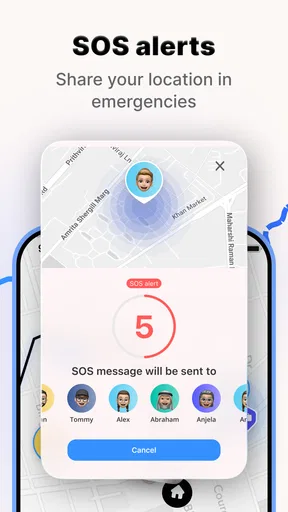
Another aspect worth highlighting is the SOS feature. In case of emergencies, a family member can send an SOS alert with their exact location, allowing you to act swiftly. This feature alone provides immense peace of mind, especially if you have kids or elderly family members.
Real-World Experience
In my experience, the app was quite accurate in locating my phone and family members. There was a minor delay occasionally, but nothing that would cause concern. The app’s interface is intuitive, with a clean design that doesn’t overwhelm you with options. It’s straightforward, which is exactly what you need when you’re in a hurry to find someone or something.
Battery usage is always a concern with location-based apps, but I was pleasantly surprised. The app seems to be optimized well, and I didn’t notice any significant battery drain. Kudos to the developers for keeping this in mind!
Who I’d recommend it to—and who should pass
I’d consider it for a household that already has a shared reason to coordinate: parents managing school journeys, relatives arranging rides to appointments, or partners who routinely need to time a pickup. In those situations, an arrival zone or a quick location check can replace a string of messages. The app is free to install, is rated for Everyone, and has a 4.4 average from around 948,000 ratings, so it has attracted a large audience; that popularity is a useful signal of reach, not a guarantee that every family will like sharing location.
I would skip it if the goal is simply to locate one lost phone and no one else wants to participate. A built-in device finder is likely the cleaner fit for that job. I would also avoid making it a condition of trust in a relationship. If a family member objects to routine tracking, a shared check-in by call or message may be a healthier solution than trying to persuade them to use a map.
Getting everyone on board without making it awkward
Before inviting relatives, explain the specific reason for sharing and agree on when it should be used. A teenager might be comfortable with an alert that confirms arrival at school but not with a parent checking every stop after classes. An adult caring for an older parent might use location as reassurance during a planned trip, while still calling if the map looks stale. Clear expectations make the app feel like coordination rather than surveillance.
It also helps to decide what the group will do when something looks wrong. If a location has not updated, start with a call or message instead of assuming the person is in danger. If someone sends an SOS, treat it as a prompt to contact them and respond according to the situation. This simple agreement prevents a useful feature from creating avoidable panic or false confidence.
What to expect from cost and setup
The app is free, with in-app purchases ranging from $2.99 to $59.99 per item. I’d begin with the free experience and only consider a purchase if a specific option solves a real problem for the household. A family locator is easy to overbuy: extra tools are not automatically valuable if everyone only needs a basic arrival check or occasional location sharing. The developer is GEO TRACK LABS LTD, and the app has been available since January 7, 2013; its current version is 6.35.2 and it requires Android 6.0 or later.
Switching from another routine has a small but real cost. If your family already uses calls, shared calendars, or a different location tool, ask what will improve before adding another app and another account to maintain. The app has more than 10 million installs, but adoption within your own household matters more than its reach. One person who does not install it can leave the group with the same coordination gap it was meant to solve.
Why You Might Want to Try It
If you’re like me, always misplacing your phone or worrying about loved ones, this app is a lifesaver. It’s not just about tracking; it’s about staying connected and ensuring everyone’s safety. Plus, with the added features like geofencing and SOS alerts, it’s more than just a simple locator app.
Whether you’re tech-savvy or a complete newbie, the app caters to all levels of users. It’s an excellent tool for families who want to stay connected in a simple yet effective way. And let’s be honest, who doesn’t like the idea of being able to track down that elusive phone without turning the house upside down?
Final Thoughts
All in all, Find my Phone - Family Locator is a reliable companion for anyone looking to simplify their life and enhance their family’s safety. It’s packed with features that are actually useful and not just there to bulk up the app. If you’re interested in giving it a shot, you can download it for both Android and iOS. So, why not give it a whirl and see how it fits into your daily routine? You might just find it’s the app you never knew you needed!
Pros
- Accurate location tracking for family safety.
- User-friendly interface with intuitive navigation.
- Real-time updates on family members' whereabouts.
- Customizable alerts for specific locations.
- Cross-platform compatibility for Android and iOS.
Cons
- Requires constant internet connection to function.
- Privacy concerns with continuous location sharing.
- Battery drain due to GPS usage.
- Subscription needed for advanced features.
- Limited features in the free version.
FAQs for Find my Phone - Family Locator
How does Find my Phone - Family Locator ensure the privacy of my location data?
Find my Phone - Family Locator takes your privacy seriously by implementing advanced encryption to protect your location data. Only users you authorize can access your location. The app also has customizable privacy settings, allowing you to control who sees your location and when, ensuring your data remains secure at all times.
Can Find my Phone - Family Locator work without an internet connection?
For optimal performance, Find my Phone - Family Locator requires an internet connection. However, it can still utilize GPS to track location updates. While offline, the app may not update locations in real-time, but it will synchronize and update once the device reconnects to the internet.
Is Find my Phone - Family Locator compatible with both Android and iOS devices?
Yes, Find my Phone - Family Locator is designed to work seamlessly across both Android and iOS platforms. Users can track and share locations between these devices without any compatibility issues, making it versatile for families with different types of smartphones.
Does Find my Phone - Family Locator have a battery-saving mode?
The app includes a battery-saving feature to minimize power consumption while running in the background. It intelligently adjusts location update frequency to conserve battery life without compromising on accuracy, ensuring your device remains functional for longer periods.
What additional features does Find my Phone - Family Locator offer besides location tracking?
In addition to location tracking, Find my Phone - Family Locator offers features such as geofencing alerts, location history, SOS emergency alerts, and group messaging. These tools are designed to enhance family safety and communication, providing peace of mind for users.


